
OPOS Case Dunning (New)
OPOS Case Dunning runs on the OPOS Case (open items case). You configure tenant-wide settings, a dunning configuration (levels and optional fees), and matching rules. When an OPOS Case is created and plan creation is enabled, instellix builds a Dunning Plan snapshot for that case from the matching configuration.
Concepts
| Concept | Meaning |
|---|---|
| Settings | Tenant switches: plan creation, issuance, PDF, deposit invoices |
| Configuration | Levels, intervals, optional fees |
| Matching rules | Specific configurations selected by case attributes (priority order) |
| Dunning Plan | Case-specific snapshot of planned levels, due dates, and fees |
| Dunning Action | Scheduled step on the plan, executed by a dunning job when due |
| Issued dunning | Persisted issuance for one action (optional fee on the case) |
| Dunning block | Pauses dunning for a case and/or customer — see Dunning Block |
Where to configure
Go to: Configuration > Billing > Dunning configuration
The page groups:
- Legacy / document-based dunning (only if still enabled for the tenant)
- Settings (OPOS Case Dunning)
- Dunning Configuration (default levels + fees)
- Matching Rules (attribute-based overrides)
Document-based and OPOS Case dunning can run in parallel for a tenant; there is no automatic migration of the old configuration into the new one.
1. Settings
| Setting | What it does |
|---|---|
| Enable Dunning Plan Creation | When enabled, instellix creates dunning plans for eligible OPOS Cases from the configurations below. When disabled, no plans are created and no dunning notifications are sent. |
| Activate dunning for deposit invoices | When enabled, deposit invoices are included in the dunning process. |
| Pause Dunning issuance | Temporary operational hold: plans continue to be created and tracked, but no notifications are sent. When the pause ends, cases can advance again. |
Pause issuance ≠ Dunning block. Pause is tenant-wide for issuance. A dunning block is per customer or per OPOS Case — see Dunning Block.
2. Matching rules
Matching rules let you apply a specific level/fee configuration when case attributes match. Rules are evaluated in priority order (reorderable). The first matching rule wins; otherwise the default configuration is used.
Match criteria (combinable per rule)
| Criterion | Example use |
|---|---|
| Billing Group | Different escalation for a product line |
| Customer Type | B2B / B2C / Affiliated |
| Operating Site | Country/entity-specific process |
| Invoice address country | Jurisdiction-specific intervals or fees |
| Customer Tax Classification | Tax-segment-specific handling |
| Currency |
Each rule has its own levels (payment reminder + max. four levels) and optional fees.
Lifecycle
OPOS Case Dunning follows three phases:
- Setup — Tenant dunning configuration applies when a document (invoice) opens an OPOS Case. If plan creation is enabled, instellix creates an OPOS Case Dunning Plan (optional: no plan if plan creation is disabled).
- Waiting — The plan holds planned levels as dunning plan actions (with optional fees). When an action’s due date is reached, the action is due.
- Issuance — A due action is processed (dunning job). Instantiation creates an Issued dunning, with an OPOS Case snapshot and an optional fee when configured.
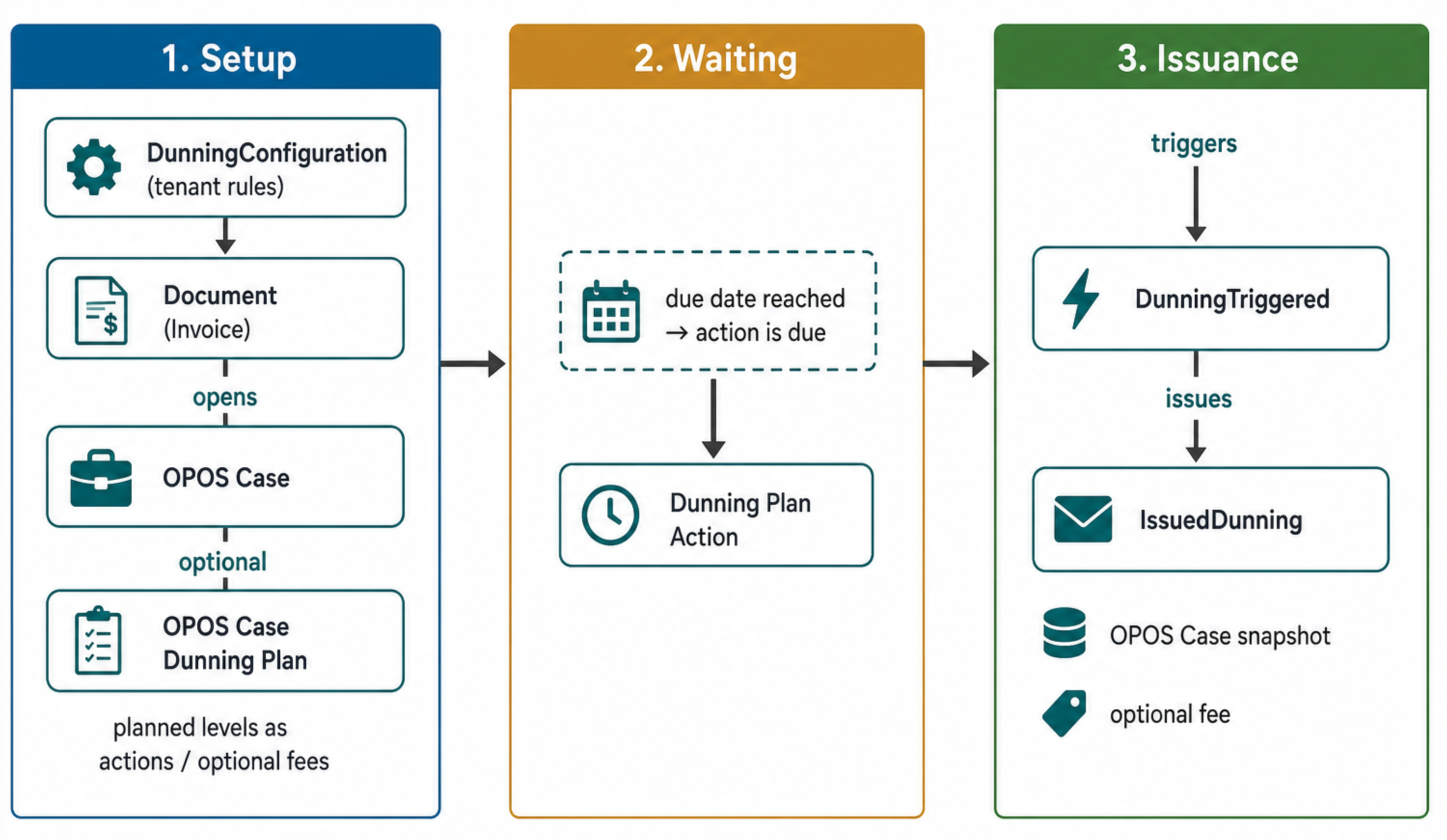
How the Dunning Plan is created
- An invoice (or eligible document) opens an OPOS Case.
- If Enable Dunning Plan Creation is on, instellix selects a configuration: first matching matching rule (based on attributes of the initial invoice).
- A Dunning Plan is stored on the case: planned levels, timing, and optional fees.
- Later changes to tenant configuration do not change existing plans.
- When a plan action’s due date is reached and issuance is not paused / blocked, the action is issued → Issued dunning (snapshot + optional fee on the case).
While a dunning block is active, due actions are not issued; when the block is removed, remaining plan dates are adjusted — see Dunning Block.
When a dunning block is active, planned actions are deferred; when the block is removed, remaining plan dates are adjusted (see Dunning Block).
Fees on the OPOS Case
- Optional fees are planned on the Dunning Plan (per level).
- The fee is booked only when the level is issued (as part of Issued dunning), not when the plan is created.
- The fee is booked on the OPOS Case as an assignment related to issued dunning
- Fee currency must match the case currency; otherwise the fee is skipped.
Document generation for issued dunning depends on PDF Creation and template provisioning for your tenant.
Create dunning document PDFs
Dunning levels and fees are configured separately. This setting only decides whether instellix creates a PDF for each issued dunning level.
Go to: Configuration > Provisioning > Dunning Provisioning
Open Default dunning provision and set PDF creation:
- PDF with accessibility — instellix creates a dunning document PDF for each dunning level issued after you save this setting.
- None — dunning still runs, and the issued notification is still sent. No dunning document PDF is created.
Default template: If no tenant-specific dunning template is configured, instellix uses the default template. Contact instellix when you need your own layout. You cannot upload the dunning template in the webportal.
Already issued levels: Turning PDF creation on does not create PDFs for dunning levels that were issued while the setting was None. Only later levels get a document.
Download the dunning document
The dunning document is not an attachment of the invoice.
When PDF creation is PDF with accessibility, each issued level is stored as its own file. Download it with:
GET /v2/files/opos-cases/{oposCaseIdent}/issuances/{issuedDunningIdent}
oposCaseIdent and issuedDunningIdent come from the notification oposCase.dunningIssued. There is no list endpoint for the files of a case.
The file is ready when you receive OPOS_CASE_DUNNING_ARCHIVED.
Related articles
Updated 14 days ago